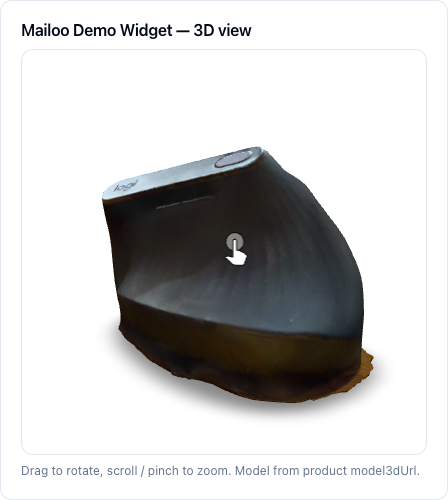
A Market product can carry an optional 3D model. Your storefront reads its public URL from the external catalog API and renders an interactive viewer: shoppers drag to rotate, scroll or pinch to zoom. When there is no model (or the browser has no WebGL), the storefront falls back to the regular product image.
Available since Mailoo 1.34.13.
Upload a model in the dashboard
- Open Dashboard → Projects → your project → Market integration → Products and edit a product.
- On the General tab find the 3D model block.
- Drop a
.glbfile onto the zone (or click it and pick the file). A progress bar is shown while uploading. - Click Publish (or Save as draft) to store the model on the product.
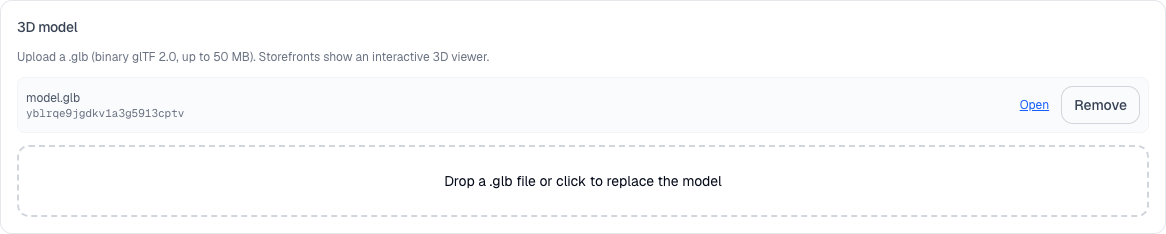
After upload the block shows the file name and media id, an Open link (the public model URL) and Remove. Dropping another file replaces the model; Remove detaches it on the next save.
File requirements
- Format: only
.glb--- binary glTF 2.0. The file content is checked (glTFheader, version 2); renaming another file to.glbis rejected..gltfwith external textures,.obj,.fbx,.usdzare not accepted for upload --- convert them to GLB first (e.g. Blender → Export glTF 2.0, format glTF Binary). - Size: up to 50 MB per file (separate from image limits). Keep models light for mobile shoppers: a few MB with compressed textures is a good target.
- Isolation: a model belongs to the Market integration it was uploaded to. It can only be attached to products of that same project and integration.
Legacy external URL
If no model is uploaded, the block also offers Or external model URL (legacy) --- a public https link to a .glb / .gltf hosted elsewhere. This field is deprecated; prefer uploading. An uploaded model always wins over the external URL.
What the storefront receives
Products returned by the external catalog API (see market-catalog-external-api{.interpreted-text role="doc"}) include two fields:
model3dUrl--- the effective model URL to render, ornull. For an uploaded model it is the public Mailoo URL{baseUrl}/api/v1/public/models/{mediaId}; otherwise the legacy external URL.model3dMediaId--- id of the uploaded GLB, ornull.
{
  "id": "mailoo_dev_market_demo_product",
  "attributes": { "name": "Mailoo Demo Widget" },
  "model3dUrl": "https://api.mailoo.app/api/v1/public/models/yblrqe9jgdkv1a3g5913cptv",
  "model3dMediaId": "yblrqe9jgdkv1a3g5913cptv"
}
The public model endpoint needs no API key, so the browser can load it directly. It streams model/gltf-binary with CORS *, Cross-Origin-Resource-Policy: cross-origin and a one-year immutable cache (the URL changes when the model is replaced).
Render the 3D viewer on your site
Any glTF viewer works. The reference implementation in the integrator demo uses Google <model-viewer> <https://modelviewer.dev/> loaded on demand:
'use client'
import { createElement, useEffect, useState } from 'react'

const MODEL_VIEWER_SRC =
  'https://ajax.googleapis.com/ajax/libs/model-viewer/4.0.0/model-viewer.min.js'

export function Product3DViewer({ modelUrl, fallbackImageUrl, alt }: {
  modelUrl?: string | null
  fallbackImageUrl?: string | null
  alt: string
}) {
  const [ready, setReady] = useState(false)
  useEffect(() => {
    if (!modelUrl || customElements.get('model-viewer')) return setReady(!!modelUrl)
    const s = document.createElement('script')
    s.type = 'module'
    s.src = MODEL_VIEWER_SRC
    s.onload = () => setReady(true)
    document.head.appendChild(s)
  }, [modelUrl])

  if (!modelUrl || !ready) {
    return fallbackImageUrl ? <img src={fallbackImageUrl} alt={alt} /> : null
  }
  return createElement('model-viewer', {
    src: modelUrl,
    alt,
    poster: fallbackImageUrl ?? undefined,
    'camera-controls': '',   // drag to rotate, scroll/pinch to zoom
    'auto-rotate': '',
    'touch-action': 'pan-y', // keep vertical page scroll on mobile
    loading: 'lazy',
    'shadow-intensity': '1',
    style: { width: '100%', aspectRatio: '1 / 1' },
  })
}
Usage with a product from the catalog API:
<Product3DViewer
  modelUrl={product.model3dUrl}
  fallbackImageUrl={product.previewImageUrl}
  alt={product.attributes.name}
/>
The full demo component (tests/integrator-demo/src/components/product-3d-viewer.tsx) adds:
- Lazy loading --- the library (~1 MB) is fetched only when the viewer scrolls into view (
IntersectionObserver), so pages without 3D pay nothing. - Fallback to the 2D image when
model3dUrlis empty, WebGL is unavailable, or the model fails to load (errorevent).
Troubleshooting
- "Only .glb (binary glTF 2.0) files are supported" / "File is not a valid GLB" --- export as glTF Binary (
.glb), glTF 2.0. - "Model too large" --- file exceeds 50 MB; reduce polygons or compress textures (e.g.
gltf-transform optimize). - Product shows only the image --- check that the product is published, that
model3dUrlis notnullin the API response, and that the browser supports WebGL.